
TIMELINE
2023
ROLE
UX/UI Designer
TYPE
Gaming UX Platform Concept
TOOLS
Figma • Miro • Trello • Wix
TEAM
Yarisel • Henry • Enrique • Michael
OVERVIEW
Snapshot
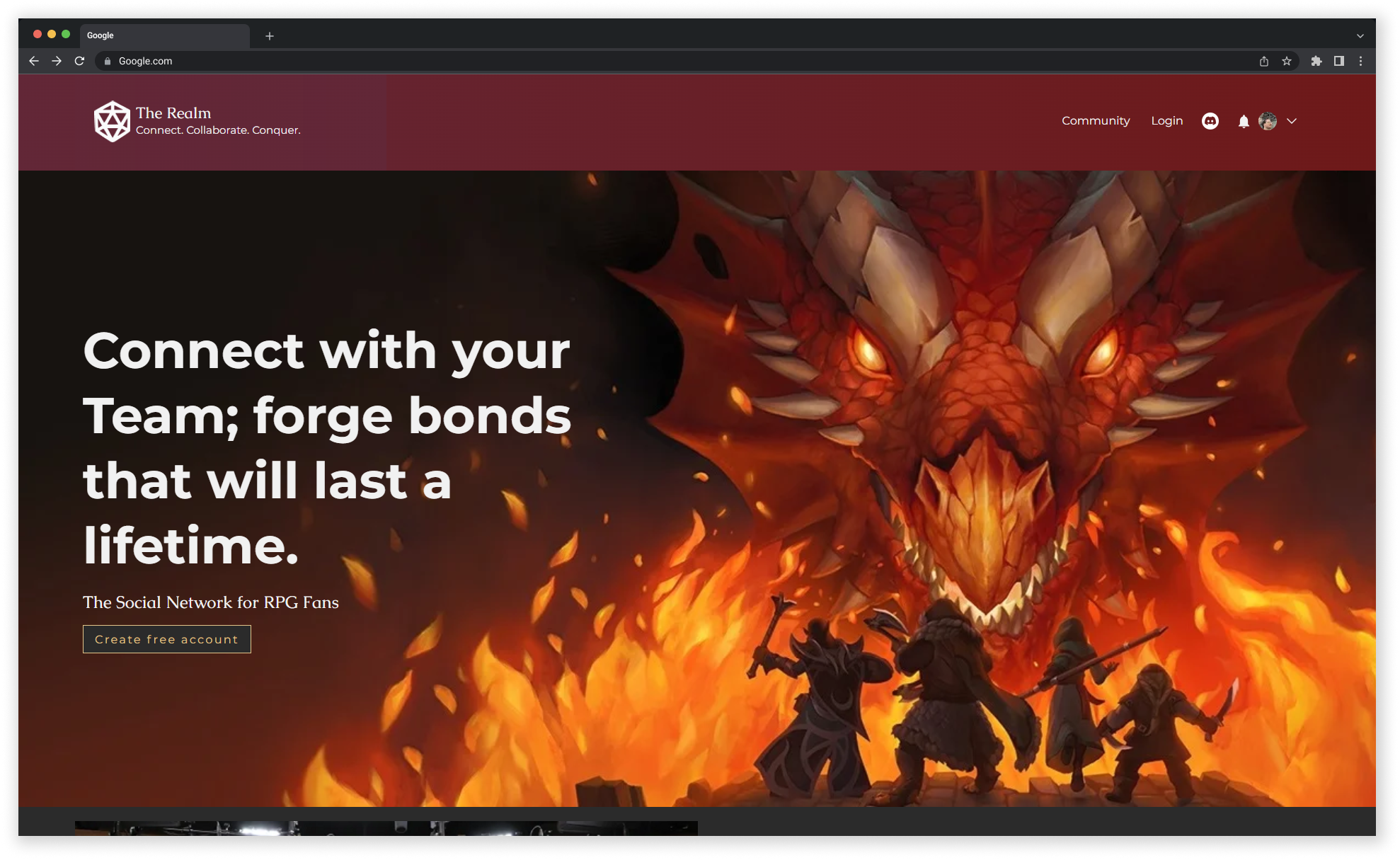
A social platform concept for tabletop RPG players who wanted a more personal way to find compatible players, organize sessions, and build stronger gaming communities.
GOAL
Design a user-friendly platform that helps tabletop RPG players discover like-minded people, connect around shared interests, and organize game sessions more easily.
DESIGN STACK
Figma
Miro
Wix
Trello
Google Forms
Zoom
DESIGN RESPONSE
• Created player discovery and filtering flows
• Designed player and character profile systems
• Structured navigation around player discovery, profiles, and community features
• Refined the prototype based on usability testing
RESEARCH FINDINGS
• Players had difficulty finding like-minded people locally
• Scheduling sessions could be a hassle
• Players wanted filtering by interests, distance, and compatibility
• Discord and text were common ways players communicated
17
SURVEY RESPONSES
Early research captured player habits, social challenges, communication preferences, and feature needs.
9
USABILITY TESTERS
Testers evaluated the prototype across account creation, player discovery, profiles, characters, and profile editing.
6
USABILITY TASKS
The testing plan covered the main flow from account creation through profile management.
THE PROBLEM
The Challenge
Research showed that communication itself was not the main barrier. Players were already using tools like Discord and text once they had people to play with. The harder part was finding the right people in the first place.
Survey responses pointed to repeated challenges around finding local players, coordinating schedules, and connecting with people who shared similar games, interests, experience levels, and play styles. Players also wanted more information about who they were connecting with before committing to a group.
The problem was not simply creating another place to chat. The Realm needed to make player discovery more structured and help people find compatible gaming connections around shared interests, preferences, location, and availability.
Core problem: RPG players needed a more personal, structured way to find compatible players and form gaming groups around shared interests and schedules.
-
Players did not always know where to find others who shared their tabletop interests. Research also showed that many relied on existing friends, word of mouth, gaming spaces, or scattered online communities to meet new players.
-
Coordinating availability came up repeatedly in the research. Work schedules, time zones, location, cancellations, and finding a time that worked for an entire group could make organizing sessions difficult.
-
Players wanted more than a list of available people. Preferences such as games, interests, distance, experience level, personality, and play style could help them decide whether another player might be a good fit.
-
The research showed that scattered players, scheduling friction, and limited ways to find compatible people made it harder to build a stronger sense of community.
“Players didn’t know how to really go about finding others who were like minded, shared a similar gaming schedule or interests.”
— SURVEY FINDING
RESEARCH PREPARATION
Defining the problem from player needs
The team combined a live interview, surveys, competitive analysis, persona work, and synthesis exercises to understand what players needed before moving into interface design.
User interview + surveys
Explored how players found groups, which platforms they used, how they communicated, and what made scheduling difficult.
Persona development
Built a player persona around someone who wanted more personal connections, easier scheduling, and a stronger local gaming community.
Competitive analysis
Compared player-discovery and community platforms to understand gaps in filtering, local discovery, moderation, scheduling, and RPG-focused functionality.
Affinity + value proposition synthesis
Grouped recurring needs around community, player discovery, compatibility, scheduling, and the social side of tabletop gaming.
Research distinction: Tabletop gaming was somewhat niche among survey participants, but interest in D&D was still present. The research also showed that people who were interested in tabletop play often needed a clearer way to find others with similar interests, availability, and gaming preferences.
HOW I WORKED
Design Approach
The design moved from player needs into structure, discovery flows, visual identity, and high-fidelity testing.
01
Define the user need
Used research to frame the product around finding compatible RPG players rather than general social networking.
02
Organize the experience
Used card sorting, sitemap work, and user flows to structure how people move through accounts, player discovery, and profiles.
03
Build the interface
Created low-fidelity layouts, style systems, player profiles, character pages, and high-fidelity prototypes.
04
Test and iterate
Ran six tasks with nine testers, identifying friction around navigation, messaging, color, alignment, and profile editing before refining the prototype.
Mapped the path to connection
The scenario followed Eric from searching for a tabletop RPG community through
onboarding, profile setup, local group discovery, and joining a group.
UX SCENARIO
WHAT THE RESEARCH REVEALED
Four artifacts that shaped the design
The Realm moved from a broad community idea into a specific product structure through persona work, card sorting, flows, and a shared visual system.
Click for a closer look
RESEARCH ARTIFACT 01
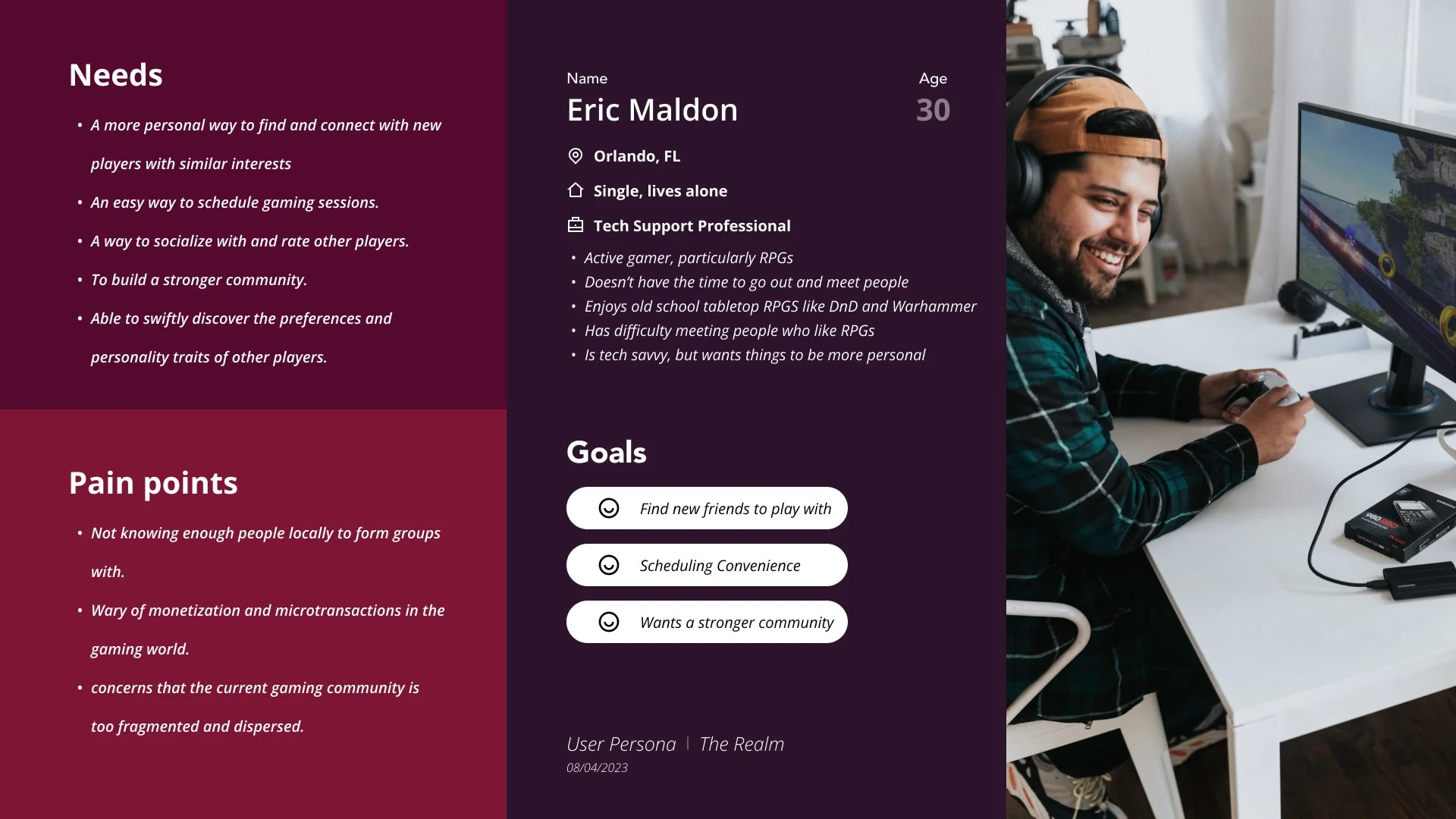
The persona centered connection and compatibility
The persona turned recurring research themes around player discovery, scheduling, compatibility, and community into a concrete reference for the design.
Click for a closer look
RESEARCH ARTIFACT 02
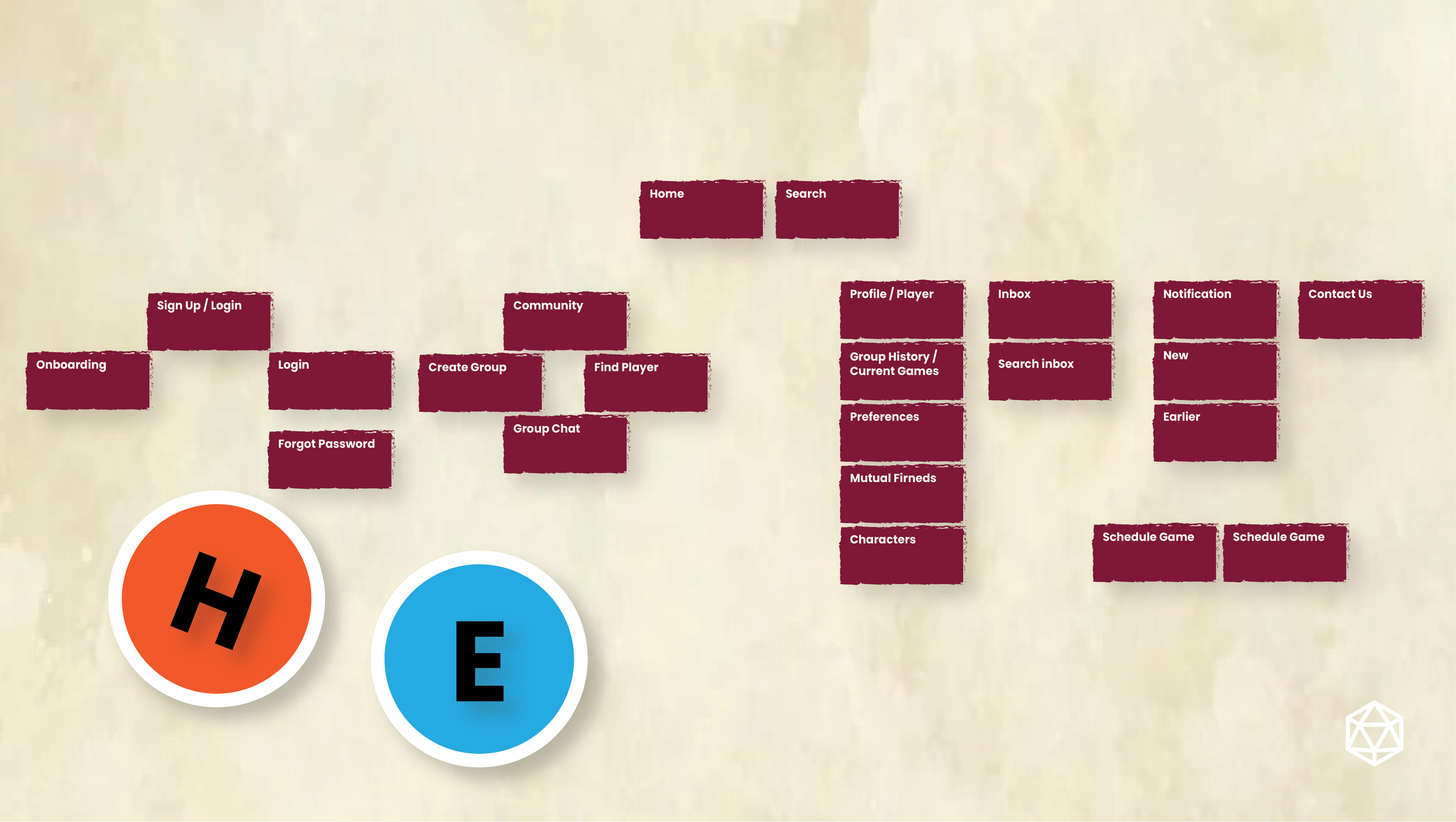
Card sorting shaped the navigation structure
The card sort grouped account, community, profile, notification, and supporting content into a shared structure that helped shape the sitemap.
Click for a closer look
RESEARCH ARTIFACT 03
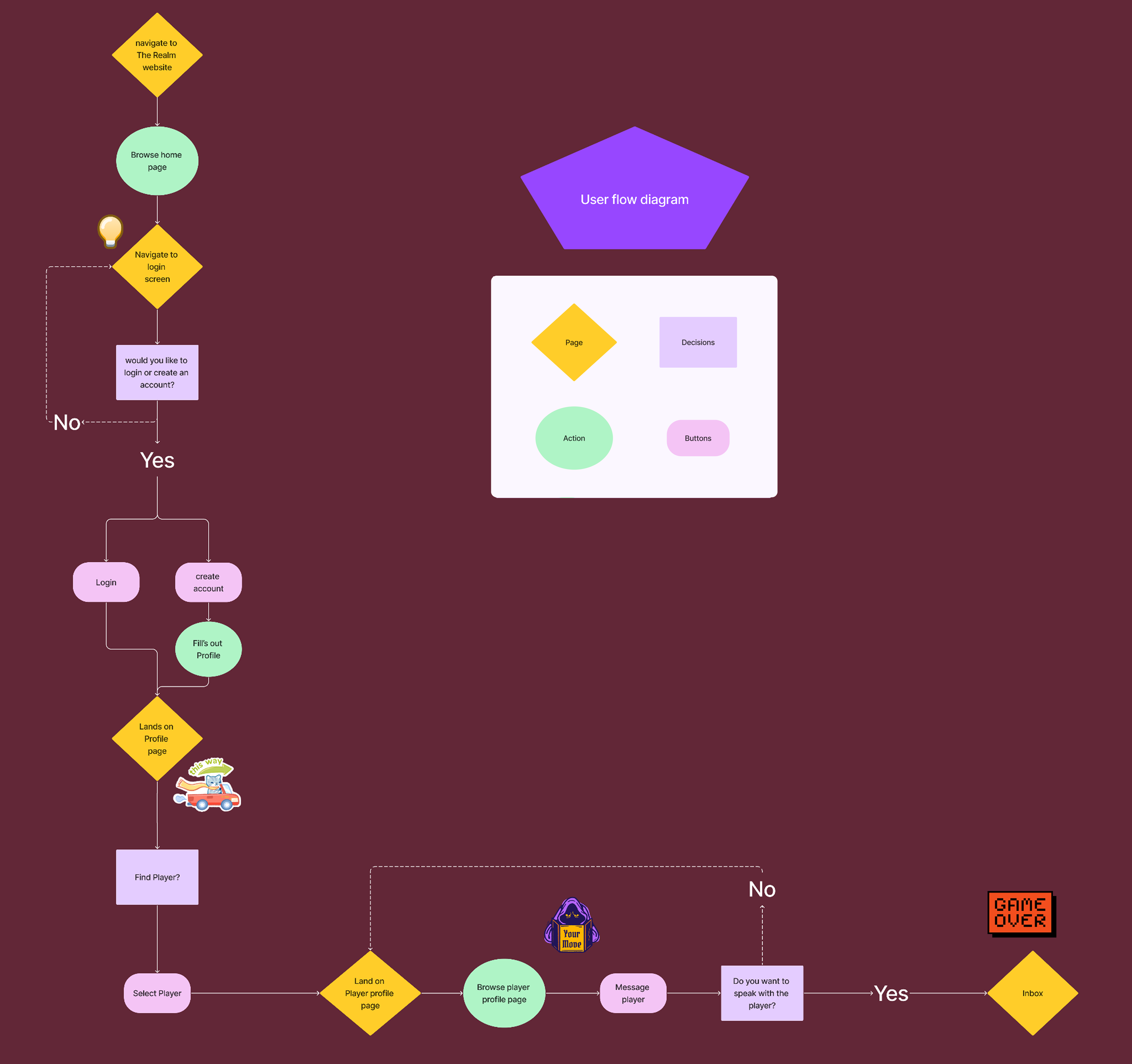
The user flow mapped sign-up to player discovery
The flow mapped how a user could create an account, set up a profile, move into player discovery, review profiles, and continue toward messaging.
Click for a closer look
RESEARCH ARTIFACT 04
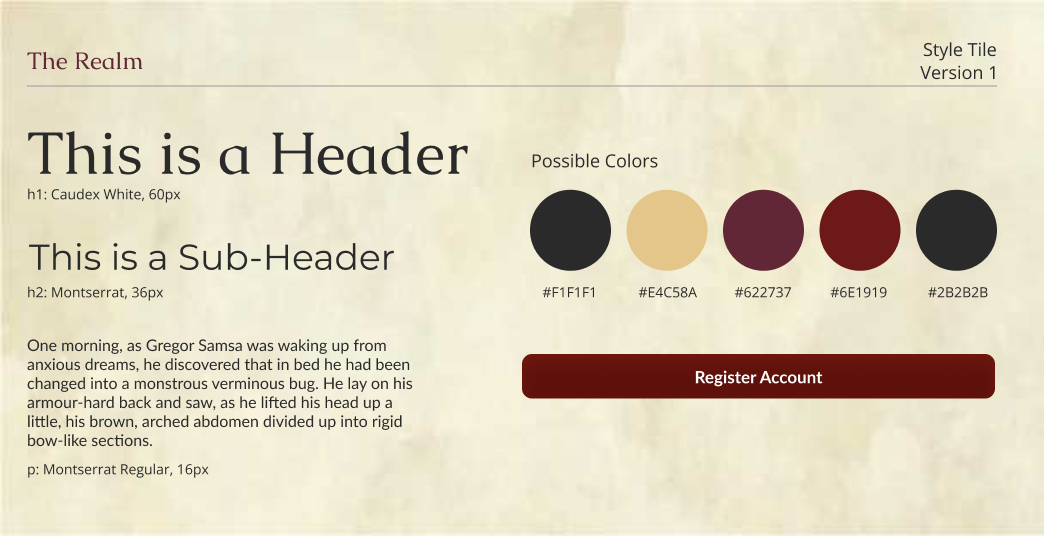
The style guide made the fantasy theme consistent
Typography, color, buttons, logos, and interface treatments were defined to keep the fantasy inspired visual direction consistent across the experience.
The structural pattern: Players needed more than a general gaming community. Profile context, filters, and clearer organization helped shape a more structured way to find compatible people.
MAIN INSIGHTS
What the research supported
01
Player discovery was central
A central product need was helping RPG players find people who matched their interests, location, and play preferences.
02
Filters made discovery feel useful
Testing specifically praised the number of player filters, with age and distance called out as sensible ways to narrow results.
03
Profiles needed enough personality
Testers liked that each player profile had its own template and image, and character pages were described as unique and game-like.
04
Flow matters as much as features
Testing showed that useful features could still create confusion when the sequence felt unclear, such as sending users directly to Find Player after registration instead of Profile.
FROM INSIGHT TO DECISION
The high-fidelity test gave the team specific feedback on what was working and what still needed refinement.
How testing guided the next iteration
01
Finding
The Create Account button felt too bright
Design Response
Adjust the color treatment so the registration CTA fits the overall palette more comfortably.
02
Finding
Users did not understand why Find Player appeared immediately after registration
Design Response
Change the post registration flow so users land on Profile first, and move relevant discovery preferences into account setup.
03
Finding
The Discord messaging icon behaved differently than users expected
Design Response
Make the messaging action clearer so users know where the Discord control will take them.
04
Finding
Profile editing and character creation needed to be clearer
Design Response
Improve the legibility of Edit Profile, make character adding more obvious, and correct alignment issues on character pages.
What this showed: Testing confirmed that the overall experience, filters, profiles, and character pages were well received while giving the team a clear list of areas to refine.
EXPLORE THE WORK
See the final prototype
The Realm website
See the implemented CMS website and how the Figma design translated into Wix.

Figma prototype
Review the player discovery, profile, and interaction flows in the high-fidelity prototype.

View the presentation
Review the project story from research and UX structure through prototype testing, iteration, and future direction.
